
School management software
The Exact Metrics Every School Leader Needs to Track Daily
A principal does not need a forty-chart dashboard. Here are the handful of numbers worth reading every morning, the weekly and termly ones that sit behind them, and how school management software should put them in front of you.
The Onflows team3 min read
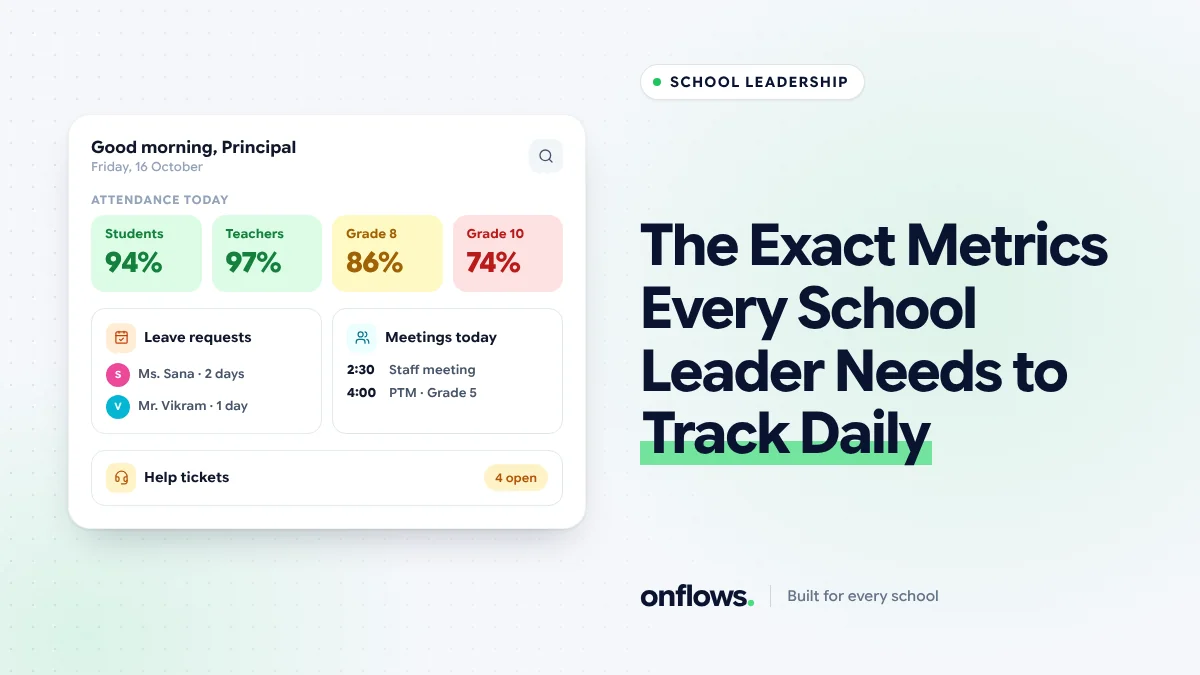
The dashboard in most school software is a wall: enrolment by gender, fee collection by month, attendance by class, a pie chart of something. It looks impressive at a demo. A principal at 7:45 am, before assembly, needs to know four things.
The daily four
1. Student attendance today
The single most useful morning number. Not the school average, but:
- The percentage present today.
- Any class well below its usual level, which often means a missed register rather than an outbreak.
- Students absent three days in a row, who need a phone call.
A digital student attendance management system gives you this by 9:30 if teachers mark in the first period.
2. Staff present and cover needed
Which teachers are absent today and whether every period they would have taught has cover. An uncovered period is a class with no adult in the room. We cover the process in assigning cover teachers the moment someone calls in sick.
3. Money in, against expected
Not the whole fee report. One line: collected this month against what was due this month. A gap that widens week by week needs attention before the term ends, not after. See setting up reminders that handle overdue fees tactfully.
4. Open issues
What families and staff are waiting on: open requests, leave awaiting a decision, tickets past their due time. One number, with the oldest item named.
That is the whole morning list. If it takes more than a minute to read, it is too long.
The weekly layer
Once a week, look at trends rather than today's numbers:
- Attendance trend by class. A class drifting down over three weeks.
- Homework submissions. Classes where submissions are falling.
- Admissions pipeline, in season. Inquiries, visits, applications, admissions. See nurturing prospective parents from open house to first payment.
- Notices not read. Families who have not read the last three notices are families you are not reaching.
The termly layer
Once a term, the numbers that shape the next year:
- Results by subject and class, compared with last year.
- Fee collection rate for the term and the list of long-overdue accounts.
- Teacher load, to catch burnout before resignations. See using timetable data to prevent teacher burnout.
- Spending against budget by category. See monitoring operational costs.
- Applications for next year, compared with previous years. See reading application trends to forecast revenue.
What a good dashboard does
- Shows the outcome first. "Attendance 94%" before "registers taken: 28 of 30".
- Links every number to the list behind it. Tapping "3 students absent three days" opens those three students.
- Gives each role its own home. A principal's home and an accountant's home answer different questions.
- Uses bars, not decorations. A bar is readable at a glance; a gauge is not.
In Onflows, every role has its own home with the numbers that role acts on, and each number opens the list behind it. See the features page for what each role sees.
What not to track daily
Enrolment totals, gender ratios, and year-to-date anything. They change slowly. Reading them daily trains you to ignore the dashboard.
Frequently asked questions
Should the principal see individual student data?
Yes, for the students who need action. A dashboard that only shows averages hides the three students who matter.
How do we get teachers to mark attendance early?
Make it take under a minute, on the device they already carry, and show them their class on the principal's list when they forget.
What if our software does not show these?
Write them down by hand for two weeks. Knowing which numbers you actually use is the best brief for any vendor.
See each role's home in Onflows, or create your school and see your first morning numbers.
Topics: School management software, Leadership, Student attendance management system, School fee management software, School management system features